-
DLL Not Found
On this page
What These Errors Mean
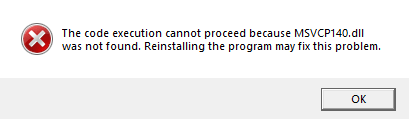
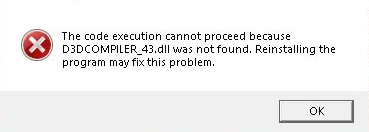
A ".dll was not found" error means a shared Windows component our software needs is missing from your PC. These files come from Microsoft, and the fix is to install the free official package that contains them, then restart.
Do not download single DLL files from "DLL download" websites. They are a common source of viruses, and the file usually does not fix the problem anyway. Always install the official Microsoft package below.Find Your Fix
Look at the DLL name in your error message and match it to the row below.
If the error names Install this MSVCP140.dll, VCRUNTIME140.dll, VCRUNTIME140_1.dll, or any api-ms-win-crt-*.dll 
Visual C++ Redistributable (x64)
Download vc_redist.x64.exe
Always-current list: Microsoft VC++ redist pageD3DCOMPILER_43.dll, D3DX9_43.dll, XINPUT1_3.dll, or similar D3DX files
DirectX End-User Runtime
Download from MicrosoftSteps
- Download the matching package from the table above.
- Run the installer. If it offers Repair, choose that.
- Restart your computer. This is required, the files will not load until you do.
- Open our loader again.
If you are not sure which one you need, or you get more than one DLL error, it is safe to install both packages.